Showing posts with label e-Learning. Show all posts

A New eBook from the eLearning Guild...


In Search of Learning Agility This publication deviates from the typical eLearning Guild eBook. We’re publishing it here because we believe that it contains a powerful and insightful view of the role educational technology plays in organizations. The central premise is that enduring competitive advantage must be built on organizational learning agility — meaning an organization’s ability to respond to adaptive challenge through the acquisition and application of knowledge and skills. The authors, Clark and Gottfredson, sketch three distinct stages of learning agility: 1.0, 2.0, and 3.0, and illustrate a clear path forward for the meaningful use of learning technologies in organizations. This is a “must read” for managers and executives who are interested in aligning learning and training efforts and investments with larger business objectives.

Access Instructions: Depending on the speed of your Internet connection, this document could take a few moments to download because of its size (39 pages in PDF format, ~421K). We urge you to save it to your computer first and then open it.

Download Link: http://www.elearningguild.com/showFile.cfm?id=3035


The eLearning Guild conducted a survey of its members, asking for their favorite tips relating to strategies for effectively creating, managing, and using synchronous e-Learning. Members could submit tips relating to any or all of five different categories. As is usual in our past surveys, the tips range in length from one-sentence ideas all the way up to multi-page discourses. You will find tips in these categories...

  • Blending Synchronous Learning with Other Learning Modalities
  • Designers of Synchronous Presentations, Courses, and Webinars
  • Managers Who Lead Synchronous Learning Efforts
  • Synchronous Speakers and Instructors
  • Technical Production, Planning, and Preparation

This FREE Digital eBook would not have been possible were it not for a generous contribution to its development from Adobe. If you're not familiar with their products, or if you haven't checked them out lately, we encourage you to look at their offerings soon!

Access Instructions: Depending on the speed of your Internet connection, this document could take a few moments to download because of its size (58 pages in PDF format, ~3MB). We urge you to save it to your computer first and then open it.

Download Link: http//www.elearningguild.com/showFile.cfm?id=2930


Learning Content Management System
The GeoLearning Learning Content Management System (GeoLCMS) is a browser-based tool for creating, delivering and managing high-quality learning content quickly and cost-effectively across your organization. Organizations just starting out in e-learning will appreciate its simplicity, while experienced developers will find that GeoLCMS offers ways to streamline their course creation process—and substantially reduce development costs.

GeoLCMS provides anyone in your organization, partner channel or customer base with critical learning and knowledge resources when they need them. Learning and knowledge sharing are driven from a single database of content that is easily created, updated and shared.

GeoLCMS is an integrated component of GeoLearning’s GeoMaestro enterprise learning and performance management platform, providing seamless content connectivity, security, session management and integrated reporting. It can also be deployed as a stand-alone system, or integrated with our GeoExpress LMS platform, as well as other third-party LMSs. Either way, GeoLCMS offers one-of-a-kind features that make the development of e-learning applications faster and more efficient.

The GeoLCMS offers several competitive advantages:

  • Rapid Content Creation
  • Powerful Collaboration Tools
  • Open Authoring
  • Reusable Learning Objects
  • Adaptive Learning Paths
  • Superior Assessment and Survey Capabilities
  • Robust Administrative Features
  • Intuitive Student Experience
  • Powerful Tracking, Reporting & LMS Integration Capabilities
  • Web-based and delivered Software as a Service (SaaS)
  • AICC, SCORM 1.2, SCORM 2004, PENS and Section 508 Compliant
“GeoLCMS offers us unlimited flexibility to create robust custom sales training content. The content reusability and intuitive environment enables our content development team and SMEs to access centralized assets and collaborate to streamline content development best practices. Our content creation and update process is rapid, reliable and scalable.”


Docebo is an Open Source e-Learning platform (LMS and LCMS) used in corporate and higher education markets.The Platform supports 18 languages and can support different didactic models. Including: Blended, Self-Directed, Collaborative and even Social Learning through Chat, Wiki, Forums and 53 other different functions.

E-learning: Docebo LMS LCMS functionality

  • LMS support SCORM 1.2 and scorm 2004 (international elearning standard) support
    The elearning System (LMS and LCMS) manage every file type (word, excel, video, audio, etc.)
  • User notification via SMS or E-Mail
  • Videoconference, chat, forum
  • Messages, advice
  • Test, polls
  • FAQ, Help, Link List, Glossary, Wiki, e-Portfolio
  • Elearning reports by user and by course
  • Organize users in company organizational trees
  • Group management
  • Docebo LMS, elearning system support interface with HR software like SAP, HR, Zucchetti, Lotus, as well as authentication systems like LDAP and Active Directory, Kerberos and NTLM
  • Business intelligence elearning system
  • Skill based
Multilanguage elearning (LMS and LCMS)

Docebo LMS LCMS is translated in following languages: Italian, English, Arabic, Croatian, Bosnian, Danish, Dutch, Farsi, French, German, Japanese, Portuguese, Russian, Chinese, Spanish, Tamil, Turkish .


eLearning ... how to start

Posted by Miro | 4:38 AM | | 0 comments »

After more than 100 projects delivered to corporate, university and government customers and with more than 100,000 hours of e-learning programs delivered, we have formalized a set process that some would consider the most common elements involved in it.Through our extensive experience we found that e-learning is not only a matter of technology, but is a sum of best practices, pre-planning activity in methodology and learning objectives.

4 main elements of on-line course delivery are:

  • LMS (e-learning platform)
  • Learning Objects
  • Human Factors (Trainers, Tutors, Supervisor)
  • Internal Sales

LMS (e-learning platform): An “in the box” metaphor for the e-learning platform. This manages the following tasks: User Management, Course catalogue, User Course policies, Learning Object Delivery
and Reporting.

Learning Objects: This is one of the most critical activities. The Learning Objects are the core of the e-learning platform. They must be well done, interactive and not bore the student. Learning Objects can contain: Text, Audio, Video, Interactive files, Games, downloadable files for “off line study” or any mix of this elements.

Human Factor: This factor can be divided into two different areas:

1. The HR office (or training, office) measures results they need to obtain in terms of learning performance with activity reports.

2. Is the activity that the tutor, the content expert and the other offices manage during the launch and in daily production activity.

Internal Sales: It is difficult that an e-learning project can follow an approach like “go and click” (means that the user is self-motivated to periodically check the training catalogue) the training office must promote every activity, talk to every course attendee and push them to complete the courses. The promotion activities can be made through different tools such as newsletters or physical
meetings.


Administrators

  • Module Manager: Administrators can install modules, enable and disable them, define a default module and menu configuration for new courses. Developers can create integrated and third party feature modules for ATutor to extend its functionality. Types of Modules administrator, instructor, group, course, and public modules, as well as fully integrated feature extensions, or third party add-on software. New in 1.6.2! modules can be imported directly from a central module repository, and can now be automatically unistalled.
    Administrator's Home Page: All administrator tools can be accessed quickly from a central Administrator Home Page.
  • Patcher Module: New in 1.6.1! Administrators can install patches issued at update.atutor.ca to keep their ATutor system up-to-date, and secure. The Patcher can also be used to share custom features across multiple installation.
    Administrator ATutor Handbook: Administrator documentation is linked from each section of the handbook to the screen ATutor it refers to. The Handbook can be translated, and mutliple translations managed for each ATutor installation.
    Multiple Administrators: Create multiple administrator accounts assigning specific privilages to each.
  • Pretty URLs: New in 1.6.1! Administrators can turn on Pretty URL to have URLs with variables attached, rewritten in a more readable form. When turned on, public courses in ATutor can be indexed by search engines.
  • Master Student List: Require newly created student accounts to be authenticated against a custom imported student ID/PIN paired list.
  • Themes Manager: Easily create a custom version of ATutor by modifying or creating a theme. Type in a URL to a theme to install it in ATutor (see Themes). Assign themes to categories of courses. Export a theme to share with others. Login to submit themes to atutor.ca to make them available to the ATutor Community. DIV-based themes are available for added accessibility. New in 1.6.2! theme designer documentation is available in the ATutor Handbook. New in 1.6.2! administrators can import community contributed themes directly from the theme respoitory on atutor.ca.
    Automated Installer and Upgrade: A fast and easy way to install or upgrade ATutor! In most cases it only take a couple minutes, with little need for technical knowledge.
  • General Statistics: View system usage statistics.
  • Secure Course Content: Secure course content directory to prevent unauthorized access to course files.
  • Instructor Request: Review requesting instructors' personal information, and assign instructor status so they may create courses. Administrators are informed by email when new requests are made.
  • User Manager: Users on a system can be sorted, personal information can be viewed, and access privileges can be modified. Send announcements to all users on an ATutor system, or to students, or to instructors. Search through the users database using a variety of search strategies to find individual students, or a group of students. Users accounts can be batch managed to rapidly add, modify, or delete accounts. View courses in which individual students are enrolled.
  • Enrollment Manager: Administrators have all the same tools for managing course enrolments as instructors do, with the ability to manage students in any course. Create an enrollment list online to add new students to a course. Automatically generate login names and passwords for students and send them by email when a student is enrolled in a course. Assign students as Alumni so they can participate in discussions for future course sessions. Filter by login, first or last name, or email address.
  • Course Manager: Much like the User Manager, courses on a system can be sorted, their properties modified, and their instructors managed. Create new courses and assign an instructor. Use course backups to generate initial content for a new course. Create shared forums for select courses, or create a community forum for all courses. Easily jump between the administration section and courses without having to re-login each time.New in 1.6.1! Administrators can create an enrolment "trigger" link, that when followed, students are enrolled in specified courses automatically when they register.
    Backup Manager: Generate backups of courses to create master copies. Download backups for safe keeping or to move courses to another ATutor server. Use backups to generate new courses.
  • Cron Utility: Optionally schedule scripts to run at specific times. Use the Cron Uitlity to run the Mail Queue every few minutes. Write custom scripts to generate statistics, create a system backup, or to send system reminders, etc. using the cron utility to schedule when they run..
  • Course Categories: The ATutor course browser includes a course category browser, so courses can be sorted into a custom defined set of categories, perhaps by department or topic or grade level, for example. Themes can be assigned to course categories so all courses within a category look the same.
  • Language Manager: Import language packs directly into ATutor. Once imported, edit languages as needed. Create an ATutor Language Pack by exporting the language from your ATutor system. Make the language pack available to other, and submit it to the atutor.ca Translation Forum as an attachment, so others can use and continue to maintain the language. Easily search through the text of the language to quickly find and customize interface, feedback, and module language.New in 1.6! All languages are available in UTF-8, and courses can display multiple languages at the same time.

Developers
  • Developer Documentation: Guidelines, instructions, recommendations for those who wish to develop ATutor core features, bundled with each ATutor distribution.
  • Module Developer Documentation: Guidelines, instructions, recommendations for those who wish to develop ATutor Modules, bundled with each ATutor distribution.New in 1.6! Install the phpDocumentor module to generate API documentation. New in 1.6.2! modules can be exported from the module manager to be shared or redistributed to other ATutor systems.
  • Theme Designer Documentation: New in 1.6.2! Guidelines for developing themes are included in the ATutor Handbook. Theme designers can export themes to share or redistribute.
  • Hello World Template Module: A sample module that implements all potential module features, which can be used as a template for creating new ATutor modules.
  • Patcher Module: New in 1.6.1! Developers can use the patcher module to create patches to fix bugs, or to add new features or feature adjustments to ATutor, that can be submitted and added to the ATutor public distribution.
  • ATutor SVN Code Repository: Developers can checkout the live evolving ATutor source code from a public Subversion repository. With approval, developers can commit their features to the respository to be include in the ATutor distribution .
  • ATutor Bug Reports: Developers can keep up on bug fixes using the ATutor Bug Tracker With approval, developers can report to, and provide comments on, bugs listed in the tracker.


ATutor is an Open Source Web-based Learning Content Management System (LCMS) designed with accessibility and adaptability in mind. Administrators can install or update ATutor in minutes, develop custom themes to give ATutor a new look, and easily extend its functionality with feature modules. Educators can quickly assemble, package, and redistribute Web-based instructional content, easily import prepackaged content, and conduct their courses online. Students learn in an adaptive learning environment.

Try the demo to experience ATutor's adaptability, and its flexibility for course designers. Download ATutor to get a copy of your own.


Why ATutor?
Accessibility
ATutor supports these accessibility standards:
W3C WCAG 1.0
W3C WCAG 2.0
W3C ATAG 2.0
US Section 508
Italy Stanca Act
IMS AccessForAll 2.0 draft
ISO FDIS 24751

Interoperability
ATutor supports these interoperability standards:
IMS Content Packaging 1.1.2+
SCORM Content Packaging
SCORM 1.2 LMS RTE3
IMS Question Test Interoperability (QTI) 1.2/2.1
IMS Common Cartridge 1.0
W3C XHTML 1.0

ATutor's base in Open Source technology makes it a cost effective tool for both small and large organizations presenting their instructional materials on the Web, or delivering fully independent online courses. Comprehensive help is available through the documentation, through a number of support services, or through the public forums. Full language support is available through the ATutor Translation Site.

Open Source
ATutor is an Open Source project. You may copy, distribute, and modify ATutor under the terms of the GNU General Public License (GPL). See ATutor Licensing for examples of permitted free use.

ATutor Awards
IMS Gold Learning Impact Award 2008: Selected by industry leaders, the IMS Learning Impact Awards recognize the high impact use of technology to improve learning across all industry segments and in all regions of the world.

Mellon Award for Technology Collaboration 2007: Presented by The Andrew Mellon Foundation. recognizing not-for-profit organizations that are making substantial contributions of their own resources toward the development of open source software and the fostering of collaborative communities to sustain open source development.


A Special Holiday Gift from The eLearning Guild!


162 Tips and Tricks forWorking with e-Learning Tools

The eLearning Guild asked members for their favorite tips for using software for the creation of e-Learning. Members could submit tips in any or all of the following five categories:


  • Courseware authoring and e-Learning development tools
  • Rapid e-Learning tools
  • Simulation tools
  • Media tools
  • Combining and deploying authoring tools
A total of 122 members responded to the survey, contributing 162 usable tips. As with our previous Tips eBook efforts, the tips range in length from one-sentence ideas all the way up to page-long discourses. Some are very basic in nature, and others are quite advanced. We have not edited the tips in any way, other than to correct spelling – everything you see in this book is in the tipsters' own words. As a result, these tips will be useful to any designer or developer looking for best practices to incorporate into their own production process.

This FREE Digital eBook would not have been possible were it not for a generous contribution to its development from these sponsors:

Trivantis Adobe Quicklessons Articulate

If you're not familiar with their products for e-Learning, or if you haven't checked them out lately, we encourage you to take a look at your earliest convenience.
Access Instructions: Depending on the speed of your Internet connection, this document could take a few moments to download because of its size (65 pages in PDF format, ~6MB). We urge you to save it to your computer first and then open it.

Download Link: http://www.elearningguild.com/showfile.cfm?id=2671

License Agreement:The content of all Guild eBooks is FREE. You are encouraged to use it, share it, and post it on your Web site and/or your organization’s Intranet. No one is authorized to charge a fee for it or to use it to collect contact information. The PDF file cannot be altered without written permission from The eLearning Guild. We request that reuse or re-distribution of this publication is accompanied by appropriate attribution to The eLearning Guild.


A Special Gift from The eLearning Guild...


The eLearning Guild'sHandbook of e-Learning Strategy

In many organizations, there is a need to better identify and document a comprehensive learning strategy and to answer the question, "What should we be doing in order to support improved learning and performance?" This e-Book will help you make a broad, fundamental connection between learning, e-Learning, and your organization's mission, business objectives, and the bottom line. Chapters address everything from crafting a focused strategy, to keeping your strategy focused, to change management. Refocus on e-Learning strategy and insure that your e-Learning technology and methodology investments pay off and so you can achieve your e-Learning goals!

This FREE Digital Book was made possible by a generous contribution to its development from Adobe Systems. To learn more about Adobe click HERE.

Access Instructions: Depending on the speed of your internet connection, this document could take a few moments to download because of its size (87 pages in PDF format, ~7.3MB). We urge you to save it to your computer first and then open it.

Download Link: http//www.elearningguild.com/showfile.cfm?id=2509

License Agreement:The content of all Guild eBooks is FREE. You are encouraged to use it, share it, and post it on your Web site and/or your organization’s Intranet. No one is authorized to charge a fee for it or to use it to collect contact information. The PDF file cannot be altered without written permission from The eLearning Guild. We request that reuse or re-distribution of this publication is accompanied by appropriate attribution to The eLearning Guild.


Molly Tipton failed at her first try last winter at putting classroom resources and homework assignments online—via a class MySpace page—after parents said they feared their children might get into trouble on the popular social- networking site.

But the 8th grade teacher has had more success this school year, with her second try. Last fall, she started using Moodle, an online course-management system that is stored on the El Paso,Texas, school district’s computer server, with access controlled by student passwords.

Through Moodle, Ms. Tipton now posts reading passages and links to Web sites that are related to her lessons. She also has set up a popular online chat room for her students and posts homework assignments online, a feature that students as well as some parents have embraced. Moodle’s online capabilities, she said, are making her social studies classes a hybrid between traditional and online courses.

Ms. Tipton is part of a growing number of K-12 educators in regular classrooms who are using course-management systems to share assignments, homework, classroom assessments, and other information with students and their parents. A course-management system is a software program that allows controlled exchanges via the Internet of just about any kind of information related to a course, although the features of individual products differ.

Blackboard Dominates
Moodle is perhaps the most popular rival to the course-management system sold by Blackboard Inc., the dominant company in the U.S. market for e-learning tools in higher education. The for-profit Washington-based company is trying to expand its foothold in what Blackboard officials call the emerging K-12 market.

Blackboard, which in 2006 bought its main for-profit competitor in higher education, WebCT, says that 400 precollegiate schools or school districts use the full or partial version of its academic product.

The company says it welcomes open-source competitors like Moodle, because interest among schools will help expand the use of course-management systems—a market that company officials believe they will dominate.

Next week, Blackboard is launching an enhanced version for small schools and districts, for an annual flat fee starting at $10,000, including online hosting and training of personnel. That rate is substantially lower than what larger institutions pay.

Still, cost remains a formidable obstacle in many school districts, and that’s one reason why Moodle is creating a buzz in the school marketplace. The software is free, with a modular design that allows educators to start using a few tools, while working gradually to add more.

The software has been developed over the past nine years by a global community, of both commercial and noncommercial users, led by Moodle, a company based in Perth, Australia. Under the terms of Moodle’s open-source license, users or their contractors may use the software on an unlimited number of computers and modify the program to add unique or specially tailored functions at will.

Yet while Moodle is free, it is not without cost. Those costs include computers, networks, and personnel to install and maintain the hardware and software, as well as the cost of training teachers, though some or all of these requirements can be outsourced to outside providers.

“It is free like a puppy, not like a beer,” says Trish Hart, a facilitator and instructor at the Alaska Vocational Technical Center, a state-run postsecondary school that uses Moodle extensively.

The school, in Seward, Alaska, offers online courses for students and teachers statewide, including professional-development offerings for secondary school teachers and advanced courses or electives for high school students. The Moodle system is run from a commercial host server in Virginia.

Other Players
Outside hosts and programming companies specializing in Moodle can provide schools with technical skills that their own technology personnel may lack, though a global community of users can also be tapped for assistance.

Commercial firms offer customized versions of Moodle, as well as hosting services. For example, Moodlerooms, a systems-integration company based in Baltimore, charges schools a fee to create customized versions of Moodle’s grade books, repositories of learning resources, warehouses for student data, and tools for real-time learning activities. The company also hosts Moodle systems for schools for an annual fee of $1 per user.

Moodle is not the only open-source, online course-management system, or CMS. Another is the Sakai Project, a free educational software platform, developed with leadership from the University of Michigan in Ann Arbor with an original grant from the Andrew W. Mellon Foundation, based in New York City. The software supports online document distribution, a grade book, discussions, live chats, assignment uploads, and online testing, among other functions.

All told, at least a dozen different online course-management systems are used in schools around the world. Confusion about the term CMS exists, though, in part because of similar and overlapping technologies. They include LMS, or learning-management system; VLE, or virtual-learning environment; and LCMS, or learning-content-management system, among others.

“There are a lot of labels to describe this [market] space,” said Jessie Woolley-Wilson, the president of Blackboard K-12.

She said that Blackboard, which began by producing software for managing the operation of online courses, now supports a “mosaic” of functions, including interactive learning; synchronous, or realtime, learning; and asynchronous learning, in which students participate at different times.

“In its most simplistic form, we are focused on delivering an engaging, effective, and increasingly individualized learning experience to learning constituencies, including students, parents, teachers, and administrators,” Ms.Woolley-Wilson said.

Blackboard will work with schools, she said, to tailor its product “from 100 percent virtual, which includes data collection and data analysis, to using technology to help lighten the load and help teachers get back to teaching,” by helping them create, manage, share, and organize course content.

Amy W. Junker, a senior analyst at Robert W. Baird & Co., an investment- research firm in Milwaukee, Wis., said she expects the K-12 market for course-management systems to expand. High schools, in particular, may see them as a way to help prepare students for higher education, where online and hybrid courses are common, she said.

“Certainly we’re going to see greater adoption of course-management systems in the K-12 market,” Ms. Junker said.

In her view, the ability for teachers to conveniently post homework assignments online—giving busy parents a better ability to keep their youngsters on track—might be the “killer application” that turns the systems into a must-have for many schools.

Complementary Services
Some companies offer other services that can be added either to Blackboard systems or the open-source alternatives such as Moodle.

For example, Elluminate Inc., a Canadian company that has its U.S. headquarters in Fort Lauderdale, Fla., provides live Web conferencing that is tailored to school functions, such as professional development for teachers. The live-video capability and moderator tools can be integrated into the use of Moodle or Blackboard.

The new Blackboard School Central service—for schools and districts with no more than 2,000 users—is a more robust package than the Blackboard Gateway product it replaces, but at a comparable price, the company says.

For an annual fee starting at $10,000, Blackboard will host an e-learning system, with software and training included, for an unlimited number of courses, including professional-development sessions.

The company said it could not provide the price for Blackboard’s Academic Suite, the comprehensive e-learning platform used by large districts or higher education institutions; that price is based on many factors, such as student enrollment, the number of users, and the services included. But Ms. Junker, the Baird analyst, said larger institutions typically pay annual fees ranging from $25,000 to $75,000 for the full suite.

Ms. Junker said that tightening school budgets and the costs of absorbing the company’s acquisitions may mean that even with the new lower-cost offering, Blackboard’s growth in the K-12 market will be tempered. She lowered her rating for Blackboard stock in November, advising investors to maintain but not increase their holdings. Still, she said, the company’s long-term prospects are bright.

Whatever course-management system they select, of course, busy educators must carve out the time to learn how to use it.

For Ms. Tipton of El Paso, learning how to use Moodle took about a day of practice last summer.

Soon afterward, she starred in an instructional video that introduces educators to Moodle, which the 64,000-student district made to interest other El Paso teachers. The video is also posted on the Teacher-Tube and YouTube video-sharing Web sites.

Ms. Tipton has plans to ramp up her own use of Moodle, first by putting podcasts of her lessons on her Moodle site to give students another avenue for learning class material, among other ideas.

She also is looking for grants to buy a classroom set of 30 laptop computers, so her students can use Moodle in class without going to the computer lab. And she plans to help train other teachers in the district.

But those projects will have to wait till summer, she said: “Once the school year has started, we have no time to try anything new.”


This FREE Digital Book...

...is an awesome collection of tips from hundreds of your professional colleagues. These tips will help you navigate the LMS minefield, streamline your selection process, and help you save money! Nowhere will you find a more comprehensive set of tips that you can use to improve your LMS and LCMS selection efforts.

This FREE Digital Book was made possible by a generous contribution to its development from Adobe Systems. To learn more about Adobe click HERE.

Access Instructions: Depending on the speed of your internet connection, this document could take a few moments to download because of its size (58 pages in PDF format, ~1,494kb). We urge you to save it to your computer first and then open it.

Download Link: http//www.elearningguild.com/showfile.cfm?id=2096

License Agreement:The content of all Guild eBooks is FREE. You are encouraged to use it, share it, and post it on your Web site and/or your organization’s Intranet. No one is authorized to charge a fee for it or to use it to collect contact information. The PDF file cannot be altered without written permission from The eLearning Guild. We request that reuse or re-distribution of this publication is accompanied by appropriate attribution to The eLearning Guild.


This FREE Digital Book...

...is an amazing collection of tips from hundreds of your professional colleagues. Nowhere will you find a more comprehensive set of tips that you can use to improve your LMS and LCMS implementation efforts. This eBook is available for everyone regardless of their affiliation with The eLearning Guild - so don't hesitate to tell all your colleagues about it!
This FREE Digital Book was made possible by a generous contribution to its development from Adobe Systems. To learn more about Adobe click HERE.

Access Instructions: Depending on the speed of your internet connection, this document could take a few moments to download because of its size (48 pages in PDF format, ~447kb). We urge you to save it to your computer first and then open it.

Download Link: http://www.elearningguild.com/showfile.cfm?id=2073

License Agreement:The content of all Guild eBooks is FREE. You are encouraged to use it, share it, and post it on your Web site and/or your organization’s Intranet. No one is authorized to charge a fee for it or to use it to collect contact information. The PDF file cannot be altered without written permission from The eLearning Guild. We request that reuse or re-distribution of this publication is accompanied by appropriate attribution to The eLearning Guild.


This FREE Digital Book...

...is an incredible collection of tips from hundreds of your professional colleagues. Why reinvent the wheel when you can learn from these tips on the management of your LMS or LCMS system! Nowhere will you find a more comprehensive set of tips that you can use to improve your LMS and LCMS management efforts.

This FREE Digital Book was made possible by a generous contribution to its development from Adobe Systems. To learn more about Adobe click HERE.

Access Instructions: Depending on the speed of your internet connection, this document could take a few moments to download because of its size (43 pages in PDF format, ~1,133kb). We urge you to save it to your computer first and then open it.

Download Link: http//www.elearningguild.com/showfile.cfm?id=2097

License Agreement:The content of all Guild eBooks is FREE. You are encouraged to use it, share it, and post it on your Web site and/or your organization’s Intranet. No one is authorized to charge a fee for it or to use it to collect contact information. The PDF file cannot be altered without written permission from The eLearning Guild. We request that reuse or re-distribution of this publication is accompanied by appropriate attribution to The eLearning Guild.


Composica Enterprise is a web-based e-learning authoring system that offers real-time collaboration among team members and provides a powerful programming-free WYSIWYG environment to create high-quality interactive e‑learning content.

Features

  • Rich web-based WYSIWYG authoring environment
  • Groupware authoring with task-management
  • Entirely programming-free
  • Unique fast-editing approach
  • Highly reusable content
  • Powerful assessment capabilities
  • Serious Games - game based learning
  • High interactivity - Multi Choice, Drag & Drop, Fill-in, Hot Spots, and other customizable interactions
    Direct and easy import from PowerPoint
  • Exciting visual effects and animations
  • Dynamic navigation elements
  • Project tagging
  • Instant preview
  • Automatic bookmarking and state restoration
  • SCORM 1.2 / 2004 and PENS conformance
  • Publish anywhere, LMS/online/offline/CD


A New eBook from The eLearning Guild!

In February and March, 2008, The eLearning Guild conducted a survey of its members, asking for their favorite tips for producing and managing Flash-based e-Learning. A total of 147 members responded to the survey, contributing 239 usable tips on 28 products (17 of which were not included in the original list). The tips range in length from one-sentence ideas all the way up to multi-page discourses. Some are very basic in nature, and others are quite advanced. These tips were different from past surveys in one significant way: Many of them contain detailed ActionScript code that will help you solve common problems. We have not edited the tips in any way, other than to correct spelling – everything you see in this book is in the tipsters' own words. As a result, these tips will be useful to any designer or developer looking for best practices to incorporate into their own production process.

If you're not familiar with their products for e-Learning, or if you haven't checked them out lately, we encourage you to take a look at your earliest convenience.
Access Instructions: Depending on the speed of your Internet connection, this document could take a few moments to download because of its size (102 pages in PDF format, ~6MB). We urge you to save it to your computer first and then open it.

Download Link:
http//www.elearningguild.com/showFile.cfm?id=2866

License Agreement: The content of all Guild eBooks is FREE. You are encouraged to use it, share it, and post it on your Web site and/or your organization’s Intranet. No one is authorized to charge a fee for it or to use it to collect contact information. The PDF file cannot be altered without written permission from The eLearning Guild. We request that reuse or re-distribution of this publication is accompanied by appropriate attribution to The eLearning Guild.


  • Know that the term “eLearning” has an ambiguous definition. Personally, I consider eLearning to be the intersection of learning and technology, where we help people do their jobs more effectively and more efficiently. But you’ll probably hear at least 25 other definitions floating around out on the web.
  • The best thing you can do at conferences is meet people and exchange contact information. Make an effort to meet experts and meet newbies. Stay in touch with these people after the conference. Learn about them and learn from them.
  • Don’t be intimidated. There are hundreds of other people that are brand new to eLearning.
  • Assemble a list of eLearning blogs. Read them often. Just ask around for suggestions. Get set up with an RSS reader, like Google Reader, and begin to read blogs on a regular basis. Our field has an incredibly active blogging community, which can also serve as a support group for you (see the next tip).
  • Start a blog about your eLearning adventures. Use blogger.com or wordpress.com to sign up for a free blog. Write blog posts on a daily or weekly basis. Talk about the successes (and roadblocks) you encounter. Trust me, you’ll see the value after a few short weeks. Blogging helps in several ways: First, it helps you reflect on your experiences and organize your thoughts. Second, you are putting your thoughts on display for other professionals to see (and they will chime in to give you feedback).
  • Become familiar with the eLearning Guild’s Research reports. You can find these on eLearningGuild.com. They are fantastic. Skim them to find what you need; you don’t need to read them in detail.
  • Always try eLearning tools before purchasing them. This applies to authoring tools, simulation tools, Learning Management Systems (LMSs), etc. Don’t be pressured into buying something unless you want it.
  • You can take several different paths in the world of eLearning. The main paths that stand out to me are: Media, Writing, and Programming. Select the path you prefer, and then surround yourself with individuals that offer the skills you do not have.
  • Helpful web sites and blogs:
    http://www.eLearningPulse.com
    http://www.eLearningLearning.com
    http://elearndev.blogspot.com
    http://elearningtech.blogspot.com
    http://discovery-thru-elearning.blogspot.com
    http://badsquare.wordpress.com
    http://blog.learnlets.com


Good luck!


Some FAQs about e-Learning

Posted by Miro | 8:04 AM | | 0 comments »

What is e-Learning?
e-Learning is using the Internet for learning. All it requires is an Internet connection and a Web browser, which enable people to learn at any time or place.It is a new style of learning in which students are not required to attend scheduled classes. It consists of a virtual learning environment on the web. You will however be able to ask questions through classrooms which will be determine in advance.This means that you can study anywhere like your home or an office at any time, and although there may be deadlines to meet, you will be able to study at your own speed. As all the material will be available to you, you will also be able to go through difficult parts of the course a number of times if you did not fully understand them the first time.

Why learn via e-Learning?
It encourages students to be more creative Students have the flexibility to access unit notes, chat room discussions and communicate with the facilitators at times which are most convenient to them.This flexibility makes it an ideal education option for people with work or personal commitments which make it difficult to attend a traditional classroom-type course. It is for example, ideal for those who work shift hours and who always seem to be sleeping when others have the chance to attend college. It is also a good option for people who cannot afford either the time or the money to travel abroad for their education.

What is the difference between online programmes and those conducted in a class?
Both programmes are quite similar except that the mode of delivery is different. For the online learning mode, everything will be conducted through the web. This includes 'attending classes' through web chat sessions, accessing module notes and even interacting with facilitators online.

Is e-Learning For Me?
e-Learning is for practically everyone. You can be a working professional who wants to refresh or update your IT skills, a student who wishes to pursue higher education, or an unemployed person who would like to study at your own pace from home. Just about anyone can tap into the power of the Internet to fulfil his learning needs.

How do I benefit from e-Learning?
e-Learning is a training solution that is cost-effective, convenient to access and consistent in quality. You can enjoy the flexibility of attending classes around your personal or work schedules, whether your goal is professional advancement, personal enrichment or earning transferable degree credits.Online courses are an exceptionally accessible, flexible resource that gives the same high-quality instruction and course content that you demand, but without the day-to-day obstacles that prevent so many of us from pursuing our opportunities. In addition, each individual’s learning progress can be monitored and fed back to you for self-evaluation. In other words, this learner-centred methodology empowers you to manage your own learning experience, making it dynamic, personal and scaleable according to your needs.

What are the advantages of e-Learning?

  • There is no need to waste time travelling to classroom lectures.
  • You can network and have discussions with lecturers and students located around the world.
  • You have the advantage of a flexible study schedule to suit your own needs.
  • There is consistent quality in the delivery of the course which does not vary from instructor to instructor.
  • On-line study encourages you to be more inquisitive, innovative and widens your access to new collaborative technologies, keeping you up-to-date with computer technology.
  • There is an on-line Evaluation Form at the end of each term for you to give immediate feedback on the programme.

How Does e-Learning Work?
You will be supported by online course materials, live chat classrooms, email and downloadable course, related documents that create a rich learning experience for you.As you receive your courseware via the Web, it allows you to work one-on-one without the constraints of a fixed time schedule or classroom location. You can go through the course materials as fast or as slow as you like, with full control and direction. This enables you, for instance, to review a topic as many times as you wish, or pick up the pace for topics you are already familiar with.
For each programme, an online facilitator who is an expert in the subject will be assigned to the course. He takes on the role of a lecturer as in a classroom setting and leads you through the learning process on a weekly basis. He interacts with you and other students via regular sessions and answers all questions posted in the discussions rooms.

Web-based Training is ideal for :

  • Professionals looking for a convenient way to refresh or update specific skills and knowledge.
  • Professionals who need to keep their certification status or credentials current by meeting certain skills criteria.
  • Adult learners who have the discipline to study at their own pace and who prefer to work independently.
  • Companies wishing to train large numbers of people within a short period of time, or a small number of people over an extended period of time.
  • Technical workers at different field, who need to enhance their positions.
    Groups which are geographically dispersed.


e-Learning 2.0

Posted by Miro | 9:52 AM | | 0 comments »

E-learning as we know it has been around for ten years or so. During that time, it has emerged from being a radical idea—the effectiveness of which was yet to be proven—to something that is widely regarded as mainstream. It's the core to numerous business plans and a service offered by most colleges and universities.

And now, e-learning is evolving with the World Wide Web as a whole and it's changing to a degree significant enough to warrant a new name: E-learning 2.0.

Where We Are Now
Before talking about where e-learning is going, it is worth spending a few words to describe here we are now.

When we think of learning content today, we probably think of a learning object. Originating in the world of computer-based delivery (CBT) systems, learning objects were depicted as being like lego blocks or atoms, little bits of content that could be put together or organized. Standards bodies have refined the concept of learning objects into a rigorous form and have provided specifications on how to sequence and organize these bits of content into courses and package them for delivery as though they were books or training manuals.

Today, e-learning mainly takes the form of online courses. From the resources distributed by MIT's OpenCourseware project to the design of learning materials in Rice's Connexions project to the offerings found from colleges and universities everywhere, the course is the basic unit of organization.

As a consequence, the dominant learning technology employed today is a type of system that organizes and delivers online courses—the learning management system (LMS). This piece of software has become almost ubiquitous in the learning environment; companies such as WebCT, Blackboard, and Desire2Learn have installed products at thousands of universities and colleges and are used by tens of thousands of instructors and students. The learning management system takes learning content and organizes it in a standard way, as a course divided into modules and lessons, supported with quizzes, tests and discussions, and in many systems today, integrated into the college or university's student information system.

In general, where we are now in the online world is where we were before the beginning of e-learning . Traditional theories of distance learning, of (for example) transactional distance, as described by Michael G. Moore, have been adapted for the online world. Content is organized according to this traditional model and delivered either completely online or in conjunction with more traditional seminars, to cohorts of students, led by an instructor, following a specified curriculum to be completed at a predetermined pace.

Trends
As we approach the halfway mark of the new millennium's first decade, the nature of the Internet, and just as importantly, the people using the Internet, has begun to change. These changes are sweeping across entire industries as a whole and are not unique to education; indeed, in many ways education has lagged behind some of these trends and is just beginning to feel their wake.

One trend that has captured the attention of numerous pundits is the changing nature of Internet users themselves. Sometimes called "digital natives" and sometimes called "n-gen," these new users approach work, learning and play in new ways .

They absorb information quickly, in images and video as well as text, from multiple sources simultaneously. They operate at "twitch speed," expecting instant responses and feedback. They prefer random "on-demand" access to media, expect to be in constant communication with their friends (who may be next door or around the world), and they are as likely to create their own media (or download someone else's) as to purchase a book or a CD .

The manner in which this new generation of users is changing markets is captured evocatively in a document called The Cluetrain Manifesto. First posted online in April 1999, the document begins with the declaration that "markets are conversations" and continues with a redefinition of the relation between producer and consumer. "Markets are getting smarter, more informed, more organized… People in networked markets have figured out that they get far better information and support from one another than from vendors." Jay Cross, writing in the same vein, talks about the "augmented learner" and the "hyper-organization" .

In learning, these trends are manifest in what is sometimes called "learner-centered" or "student-centered" design. This is more than just adapting for different learning styles or allowing the user to change the font size and background color; it is the placing of the control of learning itself into the hands of the learner .

"The changing demographics of the student population and the more consumer/client-centered culture in today's society have provided a climate where the use of student-centered learning is thriving" . Learning is characterized not only by greater autonomy for the learner, but also a greater emphasis on active learning, with creation, communication and participation playing key roles, and on changing roles for the teacher, indeed, even a collapse of the distinction between teacher and student altogether .
Taking this approach even further is George Siemens's Connectivism. "We derive our competence," writes Siemens, "from forming connections... Chaos is a new reality for knowledge workers... Unlike constructivism, which states that learners attempt to foster understanding by meaning-making tasks, chaos states that the meaning exists— the learner's challenge is to recognize the patterns which appear to be hidden. Meaning-making and forming connections between specialized communities are important activities." Readers of Douglas Rushkoff's Cyberia will recognize a similar theme as knowledge-working is no longer thought of as the gathering and accumulation of facts, but rather, the riding of waves in a dynamic environment .

The breaking down of barriers has led to many of the movements and issues we see on today's Internet. File-sharing, for example, evolves not of a sudden criminality among today's youth but rather in their pervasive belief that information is something meant to be shared. This belief is manifest in such things as free and open-source software, Creative Commons licenses for content, and open access to scholarly and other works. Sharing content is not considered unethical; indeed, the hoarding of content is viewed as antisocial . And open content is viewed not merely as nice to have but essential for the creation of the sort of learning network described by Siemens .

Numerous writers, even, have called for what is often referred to as the "open society." Tapscott, for example, writes about "the transparent burger" and "the naked corporation." Mougayar tells us that "the future organization is an "open corporation." And in a widely popular online essay Rob Paterson asked, "Is not the new "big idea" of our time to disintermediate the institutional middleman and to enable direct relationships? Are supermarkets eternal? Do we need factory universities to learn? Is our health dependent on a doctor? Is the news what we see on TV?" .

In short, the structures and organization that characterized life prior to the Internet are breaking down. Where intermediaries, such as public relations staff, journalists or professors, are not needed, they are disregarded. Consumers are talking directly to producers, and more often than not, demanding and getting new standards of accountability and transparency. Often, they inform the productive process itself, and in many cases, replace it altogether. Passive has become active. Disinterested has become engaged. The new Internet user may not vote, but that is only because the vote is irrelevant when you govern yourself.

The Web 2.0
The first sign that something was changing on the Web was the underground popularity of a site called LiveJournal and the very visible surge of interest in a site called Friendster. These sites, which came to be called "social networking sites," were rapidly emulated by such services as Tribe, LinkedIn, Google's Orkut, Flickr, and Yahoo 360. Writers conversant with the works of social network analysts, people like Duncan J. Watts and Mark Buchanan, for example, noticed that similar patterns existed in these online networks . Something was happening here.
What was happening was that major parts of the World Wide Web were acquiring the properties of communications networks, the sorts of networks found to exist (albeit on a much smaller scale) in the physical world. And that the Web itself was being transformed from what was called "the Read Web" to the "Read-Write Web," in accordance with Tim Berners-Lee's original vision. Proponents of this new, evolving Web began calling it Web 2.0 and in short order the trend became a movement.

"Enter Web 2.0, a vision of the Web in which information is broken up into "microcontent" units that can be distributed over dozens of domains. The Web of documents has morphed into a Web of data. We are no longer just looking to the same old sources for information. Now we're looking to a new set of tools to aggregate and remix microcontent in new and useful ways" .

In a nutshell, what was happening was that the Web was shifting from being a medium, in which information was transmitted and consumed, into being a platform, in which content was created, shared, remixed, repurposed, and passed along. And what people were doing with the Web was not merely reading books, listening to the radio or watching TV, but having a conversation, with a vocabulary consisting not just of words but of images, video, multimedia and whatever they could get their hands on. And this became, and looked like, and behaved like, a network.

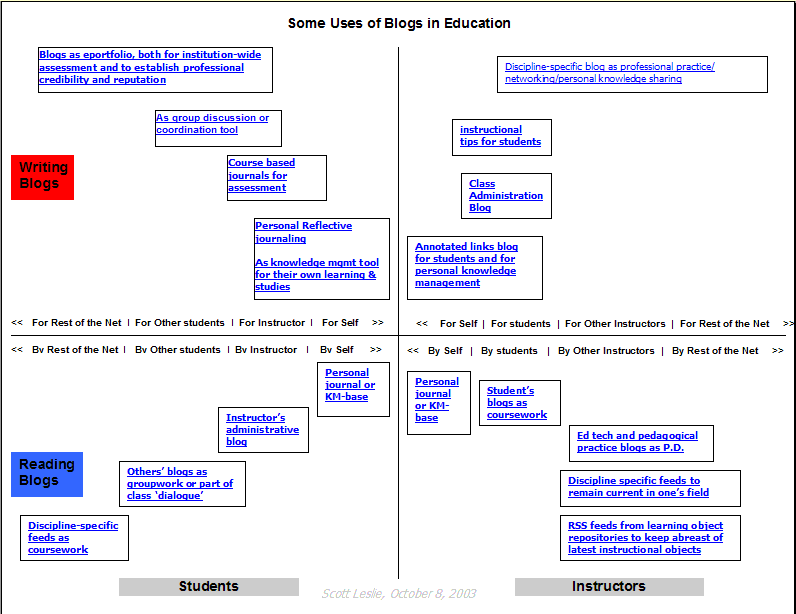
Nowhere is this clearer than in the world of blogging. In a few short years the blog went from a few idiosyncratic Web sites to something used by millions of people empowered by content creation tools such as Blogger and Wordpress. Even more importantly, these blogs were connected to each other through the mechanism of RSS, a simple XML format that allows bloggers to send their content to a network of readers (called 'subscribers').

But it wasn't just blogging. Creating an online community became a snap with tools such as Plone and Drupal. Moreover, using a collaborative writing tool called the wiki Jimmy Wales and a few thousand of his friends created a site called Wikipedia, rendering Encyclopedia Britannica obsolete in the process. Others, using the free audio-recording tool Audacity, began recording their own talk and music; this, when combined with RSS, became podcasting, a rapidly rising phenomena that is transforming what we think about radio.

For all this technology, what is important to recognize is that the emergence of the Web 2.0 is not a technological revolution, it is a social revolution. "Here's my take on it: Web 2.0 is an attitude not a technology. It's about enabling and encouraging participation through open applications and services. By open I mean technically open with appropriate APIs but also, more importantly, socially open, with rights granted to use the content in new and exciting contexts" .

E-Learning 2.0
In the world of e-learning, the closest thing to a social network is a community of practice, articulated and promoted by people such as Etienne Wenger in the 1990s. According to Wenger, a community of practice is characterized by "a shared domain of interest" where "members interact and learn together" and "develop a shared repertoire of resources."
For the most part, though, what constituted "community" in online learning were artificial and often contrived "discussions" supported by learning management systems . These communities were typically limited to a given group of learners, such as a university class, had a fixed start and end-point, and while substantially better than nothing, rarely approached Wenger's theory.
That's not to say no communities of practice were forming. There were some attempts to foster them, as for example MuniMall, directed toward the municipal governance sector, and PEGGasus, directed toward engineers and geophysicists. Moreover, as commentator Erin Brewer has noted, places on the Internet like Yahoo! Groups have become a locus for community learning activities. But in general, the uptake has been slow, and the support from traditional institutions almost nonexistent.

Educators began to notice something different happening when they began to use tools like wikis and blogs in the classroom a couple of years ago. All of a sudden, instead of discussing pre-assigned topics with their classmates, students found themselves discussing a wide range of topics with peers worldwide. Imagine the astonishment, for example, when, after writing a review of a circus she had viewed, a Grade 5 student received a response from one of the performers . In a very short time, blogs were used for a wide variety of purposes in education; an educational bloggers' network formed and by this year thousands of teachers were encouraging their students to blog.

Blogging is very different from traditionally assigned learning content. It is much less formal. It is written from a personal point of view, in a personal voice. Students' blog posts are often about something from their own range of interests, rather than on a course topic or assigned project. More importantly, what happens when students blog, and read reach others' blogs, is that a network of interactions forms-much like a social network, and much like Wenger's community of practice.

It's not just blogging. Educators have also taken an interest in podcasting. Some have started broadcasting, such as at McMaster, where engineering professors now host an online show .

"We're talking to the download generation," said Peter Smith, associate dean, Faculty of Engineering. "Why not have the option to download information about education and careers the same way you can download music? It untethers content from the Web and lets students access us at their convenience." Moreover, using an online service such as Odeo, Blogomatrix Sparks, or even simply off-the-shelf software, students can create their own podcasts.

What happens when online learning ceases to be like a medium, and becomes more like a platform? What happens when online learning software ceases to be a type of content-consumption tool, where learning is "delivered," and becomes more like a content-authoring tool, where learning is created? The model of e-learning as being a type of content, produced by publishers, organized and structured into courses, and consumed by students, is turned on its head. Insofar as there is content, it is used rather than read— and is, in any case, more likely to be produced by students than courseware authors. And insofar as there is structure, it is more likely to resemble a language or a conversation rather than a book or a manual.

The e-learning application, therefore, begins to look very much like a blogging tool. It represents one node in a web of content, connected to other nodes and content creation services used by other students. It becomes, not an institutional or corporate application, but a personal learning center, where content is reused and remixed according to the student's own needs and interests. It becomes, indeed, not a single application, but a collection of interoperating applications—an environment rather than a system.

It also begins to look like a personal portfolio tool . The idea here is that students will have their own personal place to create and showcase their own work. Some e-portfolio applications, such as ELGG, have already been created. IMS Global as put together an e-portfolio specification . "The portfolio can provide an opportunity to demonstrate one's ability to collect, organize, interpret and reflect on documents and sources of information. It is also a tool for continuing professional development, encouraging individuals to take responsibility for and demonstrate the results of their own learning" .

This approach to learning means that learning content is created and distributed in a very different manner. Rather than being composed, organized and packaged, e-learning content is syndicated, much like a blog post or podcast. It is aggregated by students, using their own personal RSS reader or some similar application. From there, it is remixed and repurposed with the student's own individual application in mind, the finished product being fed forward to become fodder for some other student's reading and use.

More formally, instead of using enterprise learning-management systems, educational institutions expect to use an interlocking set of open-source applications. Work on such a set of applications has begun in a number of quarters, with the E-Learning Framework defining a set of common applications and the newly formed e-Framework for Education and Research drawing on an international collaboration. While there is still an element of content delivery in these systems, there is also an increasing recognition that learning is becoming a creative activity and that the appropriate venue is a platform rather than an application.

In the future it will be more widely recognized that the learning comes not from the design of learning content but in how it is used. Most e-learning theorists are already there, and are exploring how learning content-whether professionally authored or created by students— can be used as the basis for learning activities rather than the conduit for learning content.

A great amount of work is being done, for example, in educational gaming and simulations. Theorists such as Clark Aldrich, and [21]. This is most evidenced when learners engage not only in playing, but in the design, of games. In the gaming world this practice is widely recognized and encouraged—game "modding" allows players to make the game their own.

Where games encourage learning is through the provision of what a student needs to know in a context where it will be immediately used. As Gee recommends, "Words are only meaningful when they can be related to experiences," said Gee. If I say "I spilled the coffee," this has a different meaning depending on whether I ask for a broom or a mop. You cannot create that context ahead of time— it has to be part of the experience. And in just the same way, the science text doesn't make any sense to someone who has not done any science (though it makes a great deal of sense to an experienced scientist)" .

A similar motivation underlies the rapidly rising domain of mobile learning —for after all, were the context in which learning occurs not important, it would not be useful or necessary to make learning mobile. Mobile learning offers not only new opportunities to create but also to connect. As Ellen Wagner and Bryan Alexander note, mobile learning "define(s) new relationships and behaviors among learners, information, personal computing devices, and the world at large" .

As this trend progresses, we find ourselves in a world characterized by the phrase "ubiquitous computing." "Where virtual reality puts people inside a computer-generated world, ubiquitous computing forces the computer to live out here in the world with people" . The "Father of ubiquitous computing," Mark Weiser, compares computing of the future to writing. "Today this technology is ubiquitous in industrialized countries. Not only do books, magazines and newspapers convey written information, but so do street signs, billboards, shop signs and even graffiti" .

In the world of learning, what this means is having learning available no matter what you are doing. Jay Cross captures this idea in the concept of "workflow learning." Sam Adkins writes, workflow learning is "a deep integration with enterprise applications assembled from Web Services into composite applications" with "task and work support fused into the aggregated business processes that make up the real-time workflow" and supported by "contextual collaboration with people and systems" and "design and modification achieved by modeling and simulation" .

Of course, there is no reason to expect that this form of learning would be restricted to the workplace. Learning integrates into every aspect of our lives, from daily household chores to arts and culture. Learning and living, it could be said, will eventually merge. The challenge will not be in how to learn, but in how to use learning to create something more, to communicate.


A Special Gift from The eLearning Guild...

This FREE Digital Book, 834 Tips for Successful Online Instruction is an amazing collection of tips from 336 of your professional colleagues. Nowhere will you find a more comprehensive set of tips that you can use to improve your knowledge and skills in online instruction. This eBook is available for everyone regardless of their affiliation with The eLearning Guild - so don't hesitate to tell all your colleagues about it!

This FREE Digital Book was made possible by a generous contribution to its development from WebEx Communications. If you're not familiar with WebEx products for online meetings and synchronous e-Learning, or if you haven't checked them out lately, we encourage you to do so at your earliest convenience! To learn more now, click HERE.

Access Instructions: Depending on the speed of your internet connection, this document could take a few moments to download because of its size (71 pages in PDF format, ~1.1 mb). We urge you to save it to your computer first and then open it.

Download Link: http//www.elearningguild.com/showfile.cfm?id=1547

License Agreement:The content of all Guild eBooks is FREE. You are encouraged to use it, share it, and post it on your Web site and/or your organization’s Intranet. No one is authorized to charge a fee for it or to use it to collect contact information. The PDF file cannot be altered without written permission from The eLearning Guild. We request that reuse or re-distribution of this publication is accompanied by appropriate attribution to The eLearning Guild.